

When searching for a garage rental, check whether the listing is for vehicle parking or storage. The terms can appear together, but the spaces serve different needs. Before you book, make sure the spot fits your vehicle, schedule, and access requirements.
Location is only one part of the decision. Compare the space, entry details, rental period, and listing terms, then check that they fit your trip or routine. This guide covers what to look for, how to compare parking options, and what to clarify before booking. If you have a parking space to offer, CurbFlip facilitates daily, weekly, and monthly reservations, and its scannable parking signs connect spaces with drivers through the platform.
Key Takeaways
- Check whether a garage rental listing is for vehicle parking or general storage before making plans.
- Compare location, vehicle fit, access, rental period, and listing details to find a space that suits your needs.
- Choose daily, weekly, or monthly parking based on your schedule, and confirm the listing terms before booking.
- If you host, list only a space you can offer, describe it accurately, and choose rental periods that fit your availability.
Garage Rental: Know Whether You Need Parking or Storage
A garage rental can refer to different arrangements. Here, the focus is a space for vehicle parking, not a place to store household items. CurbFlip facilitates daily, weekly, and monthly parking reservations. It does not offer general garage storage, so confirm that a listing is for parking before booking.
Location, access, and rental length all affect whether a space works for you. In New York or Chicago, a spot near your destination may be convenient for a regular commute, while a farther location could suit a longer trip. Compare the route with your plans, and check how you’ll enter and leave the space.
For context on the traditional purpose of a residential garage, see this overview. To explore another way garages may be repurposed, watch this video:
What does a garage rental listing actually include?
Read the listing rather than assuming “garage” means an enclosed space. Check whether the spot is enclosed, covered, or designated parking. Review the access instructions, permitted vehicle types, and rental terms. If an important detail is missing, ask the host to clarify before booking.
Match the rental period to your schedule. A daily option may suit a short visit, while weekly or monthly parking may fit a longer trip or regular routine. Confirm the dates and access arrangements before reserving the space.
How to Choose a Garage Rental That Fits Your Parking Needs
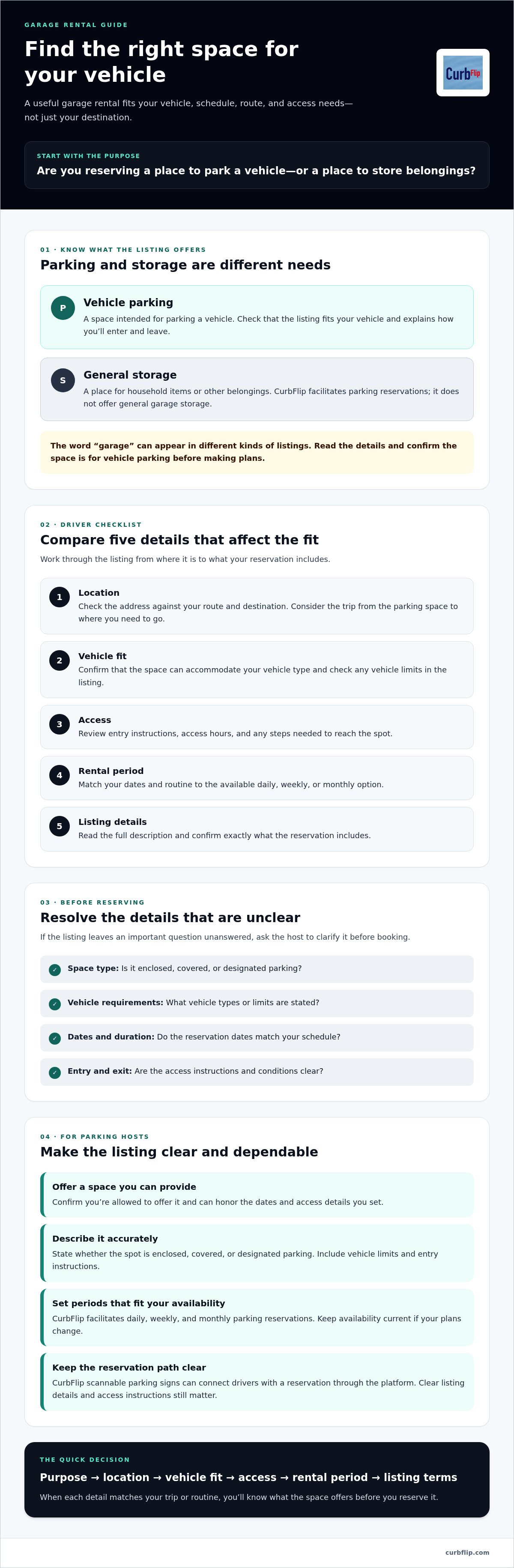
A garage rental should fit your trip, vehicle, and access needs, not just appear close on a map. Use this checklist to compare listings:
- 1. Location: Check the address and how it fits your route and destination.
- 2. Vehicle fit: Confirm the space can accommodate your vehicle type.
- 3. Access: Review entry instructions, access hours, and any steps needed to reach the spot.
- 4. Rental period: Match your dates to daily, weekly, or monthly options.
- 5. Listing details: Read the full description and confirm what the booking includes.
Think about the whole journey, not only the distance to your destination. In Los Angeles, a spot near where you’re going may simplify your route. In Austin, nearby amenities could matter if you’ll leave your vehicle parked while you work or run errands. Consider how you’ll travel from the space to your destination. The University of Arkansas’ work on transportation and parking solutions is a reminder to assess parking as part of the wider trip.
Which details should drivers confirm before booking?
If the vehicle fit or entry instructions aren’t clear, contact the host before reserving. Confirm the dates, rental period, and any stated access conditions. Compare your schedule with the daily, weekly, or monthly options available in your chosen location, then review the listing terms before booking and paying online.
If you host parking and want a sign to support the booking process, explore CurbFlip scannable parking signs.
How to Rent Out Garage Parking Through an Online Marketplace
If you have a parking space to make available, an online marketplace can help you present it to drivers looking for parking. Before creating a garage rental listing, confirm that you’re allowed to offer the space and can honor the dates and access details you set. List only a space you can provide, and describe it accurately. State whether it’s enclosed, covered, or designated parking, and include any vehicle limits and entry instructions.
Choose rental periods that match your availability. CurbFlip facilitates daily, weekly, and monthly parking reservations, so you can select options that suit your schedule. Make sure the listing reflects when you can actually offer the spot, and update its availability if your plans change.
Can a host make garage parking easier to reserve?
A clear listing helps drivers understand what they’re reserving. A scannable parking sign can also connect drivers with a reservation through CurbFlip. The sign supports the booking process, but it doesn’t replace accurate listing details or clear access instructions. For more background, look for CurbFlip Scannable Parking Signs: The Ultimate Guide to Passive Parking Income in 2026.
If you’re in the U.S. and have questions about tax treatment, review the IRS rules on rental income and consider seeking advice for your situation. Keep your listing straightforward, set rental periods you can honor, and make sure drivers know what to expect before they reserve.
Hosts who want to explore the sign option can explore CurbFlip scannable parking signs.
Choose Your Next Parking Step With Confidence
A successful garage rental starts with understanding what the listing offers. Check that the location, vehicle fit, access, and rental period match your plans. Clear details help drivers choose a suitable space and help hosts set expectations from the start.
If you have a parking space to share, choose daily, weekly, or monthly availability that fits your schedule. CurbFlip facilitates reservations across those rental periods, and its scannable parking signs connect with the platform to support the booking process.
Ready to list a space with a scannable sign? Explore CurbFlip scannable parking signs.
Frequently Asked Questions
Can I rent a garage for parking through CurbFlip?
CurbFlip facilitates parking reservations, but garage-specific listings depend on the location you search. Look for options in your area, whether that’s New York, Chicago, Los Angeles, Seattle, Atlanta, San Francisco, London, Denver, Miami, Dallas, Houston, Austin, Nashville, Memphis, New Orleans, Southern California, Toronto, Montreal, or Vancouver. Before booking, confirm that the listing offers vehicle parking, not general garage storage.
What should I check before booking a garage rental?
Confirm the location, whether the space fits your vehicle, and how you’ll access it. Check if the listing describes enclosed, covered, or designated parking, then review the rental dates and terms. If vehicle fit or entry instructions aren’t clear, contact the host for details before you book and pay online.
Can I rent garage parking by the day, week, or month?
Yes. CurbFlip facilitates daily, weekly, and monthly parking reservations. Choose a rental period that fits your trip or routine, then check the listing dates and terms to make sure they match your plans. A short visit may call for a daily reservation, while travel or regular parking needs may suit a weekly or monthly option. Confirm that garage-specific listings are available in your chosen location.
How can I rent out my garage parking space?
List only a parking space you can offer, and describe it accurately. Include its location, whether it’s enclosed, covered, or designated parking, any vehicle fit details, access instructions, and the dates you can host. Choose daily, weekly, or monthly availability to match your schedule. CurbFlip also offers scannable parking signs that connect with its platform and support reservations.
Disclaimer
The content provided in this article is for informational purposes only. All uses of the CurbFlip name, images, logos, and likeness are the exclusive property of CurbFlip.com. This article may contain information researched by a third-party, meaning CurbFlip does not guarantee the accuracy, completeness, or reliability of any third-party information presented herein and assumes no liability for any decisions made or actions taken based on this content.